LMS Integrated with HRMS Systems: Benefits, Features, and Implementation Guide

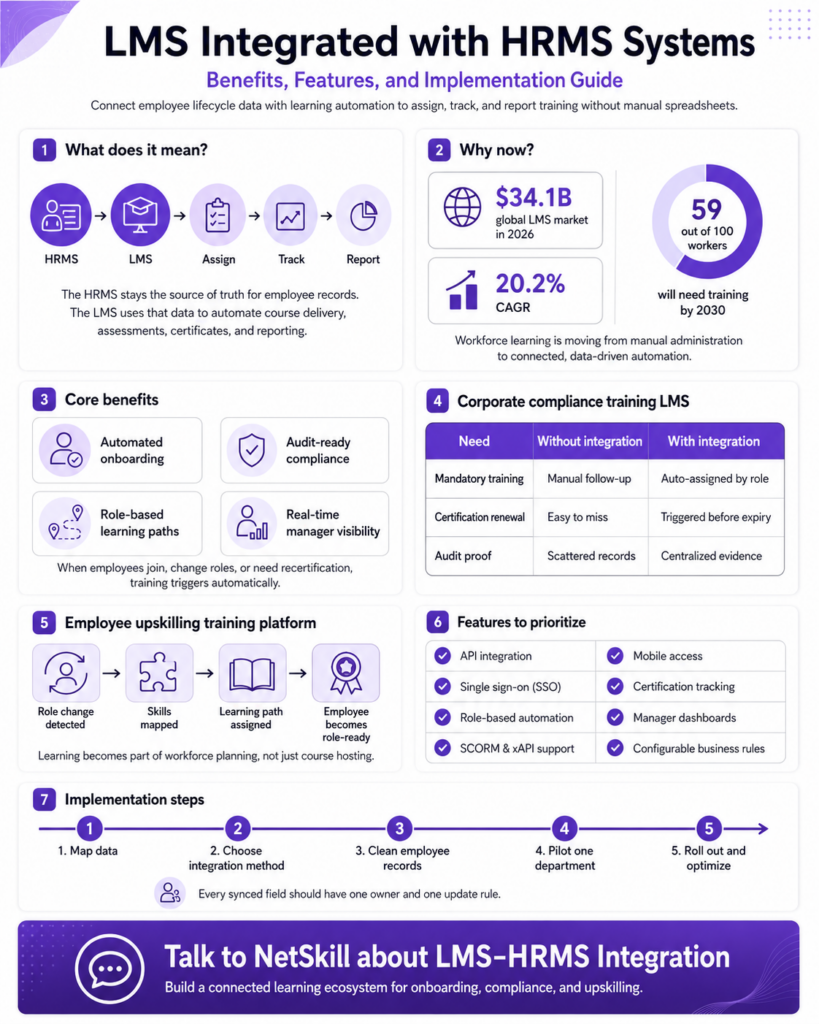
An LMS integrated with HRMS systems connects your learning platform directly to employee lifecycle data, so training gets assigned, tracked, and reported automatically instead of through manual spreadsheet work. When a new hire joins, changes roles, or comes up for recertification, the learning system reacts on its own because it’s reading the same employee record the HR system already maintains.

This matters more in 2026 than it did even two years ago. Grand View Research values the global LMS market at $34.1 billion this year, growing at a 20.2% CAGR and a large share of that growth is coming from platforms that connect to HR and enterprise systems rather than standing alone as a course library.

What Does LMS-HRMS Integration Actually Mean?

It means your learning platform and your HR system exchange data automatically instead of relying on someone to manually keep both in sync. The HRMS stays the source of truth for employee records name, role, department, manager, location while the LMS handles course delivery, assessments, certificates, and reporting on top of that data.

SAP defines an LMS as software used to administer, document, track, report, automate, and deliver training programs. Without integration, that automation stops at the LMS’s edge someone still has to manually add every new employee, update every role change, and remove every departure. With HRMS integration, those triggers fire on their own: a new hire in the HRMS automatically becomes a new learner in the LMS, already assigned the right induction path based on their actual role and location, with zero manual setup required from HR or IT.

Why Does Workforce Learning Need HRMS Integration Now?

Workforce learning needs HRMS integration now because skill demands are shifting faster than manual training administration can track. The World Economic Forum’s Future of Jobs Report 2025 found that if the global workforce were represented by 100 people, 59 would need reskilling or upskilling by 2030 and 11 of those 59 are unlikely to receive it at all under current systems.

That scale of change breaks any process that depends on someone remembering to assign a course. HR teams managing training through spreadsheets and manual enrollment typically discover gaps only after an audit, a missed certification, or a manager complaint not before. An integrated system flips that: role changes, location transfers, and compliance deadlines all trigger the right training automatically, the same day the underlying HR data changes, rather than whenever someone gets around to updating the LMS separately.

What Are the Core Benefits of a Corporate Compliance Training LMS?

A corporate compliance training LMS automatically assigns mandatory courses by role, location, and certification status, then keeps a complete, audit-ready record of who completed what and when. This removes the single biggest risk in manual compliance tracking: training that quietly falls through the cracks because no one caught an expired certification in time.

Oracle Learning highlights automated compliance assignment, certification validity tracking, renewal triggers, and compliance dashboards as core capabilities of a connected system and this is exactly where BFSI, healthcare, pharma, and manufacturing organizations feel the most pressure, since training proof there is often a regulatory requirement, not a best practice. With HRMS data driving assignment, a compliance officer can answer “who’s overdue right now” in seconds rather than assembling that answer manually before an audit deadline.

See how compliance tracking works →

How Does an Employee Upskilling Training Platform Support Career Growth?

An employee upskilling training platform turns HRMS role and skills data into a personalized learning path instead of a generic course catalog every employee sees the same way. When an employee’s designation, department, or grade changes in the HRMS, the platform can recommend or automatically assign the specific courses that role now requires.

This is where HRMS-driven learning goes beyond course hosting into actual workforce planning. A finance employee moving into an analytics role, for example, can be assigned SQL, Power BI, and data storytelling modules the same day their role change is logged not weeks later when someone notices the gap. That timing difference is the entire value proposition: employees become ready for a role before the business feels the capability gap, instead of catching up after the fact once performance already suffers.
An LMS integrated with HRMS systems connects your learning platform directly to employee lifecycle data, so training gets assigned, tracked, and reported automatically instead of through manual spreadsheet work. When a new hire joins, changes roles, or comes up for recertification, the learning system reacts on its own because it's reading the same employee record the HR system already maintains. This matters more in 2026 than it did even two years ago. Grand View Research values the global LMS market at $34.1 billion this year, growing at a 20.2% CAGR and a large share of that growth is coming from platforms that connect to HR and enterprise systems rather than standing alone as a course library. What Does LMS-HRMS Integration Actually Mean? It means your learning platform and your HR system exchange data automatically instead of relying on someone to manually keep both in sync. The HRMS stays the source of truth for employee records name, role, department, manager, location while the LMS handles course delivery, assessments, certificates, and reporting on top of that data. SAP defines an LMS as software used to administer, document, track, report, automate, and deliver training programs. Without integration, that automation stops at the LMS's edge someone still has to manually add every new employee, update every role change, and remove every departure. With HRMS integration, those triggers fire on their own: a new hire in the HRMS automatically becomes a new learner in the LMS, already assigned the right induction path based on their actual role and location, with zero manual setup required from HR or IT. Why Does Workforce Learning Need HRMS Integration Now? Workforce learning needs HRMS integration now because skill demands are shifting faster than manual training administration can track. The World Economic Forum's Future of Jobs Report 2025 found that if the global workforce were represented by 100 people, 59 would need reskilling or upskilling by 2030 and 11 of those 59 are unlikely to receive it at all under current systems. That scale of change breaks any process that depends on someone remembering to assign a course. HR teams managing training through spreadsheets and manual enrollment typically discover gaps only after an audit, a missed certification, or a manager complaint not before. An integrated system flips that: role changes, location transfers, and compliance deadlines all trigger the right training automatically, the same day the underlying HR data changes, rather than whenever someone gets around to updating the LMS separately. What Are the Core Benefits of a Corporate Compliance Training LMS? A corporate compliance training LMS automatically assigns mandatory courses by role, location, and certification status, then keeps a complete, audit-ready record of who completed what and when. This removes the single biggest risk in manual compliance tracking: training that quietly falls through the cracks because no one caught an expired certification in time. Oracle Learning highlights automated compliance assignment, certification validity tracking, renewal triggers, and compliance dashboards as core capabilities of a connected system and this is exactly where BFSI, healthcare, pharma, and manufacturing organizations feel the most pressure, since training proof there is often a regulatory requirement, not a best practice. With HRMS data driving assignment, a compliance officer can answer "who's overdue right now" in seconds rather than assembling that answer manually before an audit deadline. See how compliance tracking works → How Does an Employee Upskilling Training Platform Support Career Growth? An employee upskilling training platform turns HRMS role and skills data into a personalized learning path instead of a generic course catalog every employee sees the same way. When an employee's designation, department, or grade changes in the HRMS, the platform can recommend or automatically assign the specific courses that role now requires. This is where HRMS-driven learning goes beyond course hosting into actual workforce planning. A finance employee moving into an analytics role, for example, can be assigned SQL, Power BI, and data storytelling modules the same day their role change is logged not weeks later when someone notices the gap. That timing difference is the entire value proposition: employees become ready for a role before the business feels the capability gap, instead of catching up after the fact once performance already suffers. Which Features Should You Prioritize in an Integrated LMS? Prioritize secure data sync, role-based automation rules, and audit-ready reporting first these are what actually make the integration functional day to day, not just technically connected. Beyond that, look for single sign-on (SSO), SCORM and xAPI support for content compatibility, mobile access for frontline teams, and manager-facing dashboards that don't require a separate login to HR data. The feature that gets overlooked most often is configuration control the ability for HR and L&D to adjust assignment rules, renewal timing, and escalation thresholds themselves, without opening an IT ticket every time a business rule changes. Platforms without this tend to work well at launch and then quietly drift out of date within a year, because every small adjustment competes with other engineering priorities. How Should You Implement HRMS-LMS Integration Step by Step? Start with data mapping, not software configuration decide exactly which employee fields need to flow between systems before picking an integration method. Common fields moving from HRMS to LMS include employee ID, role, department, location, and manager; fields flowing back typically include completion status, assessment scores, and certificate expiry dates. From there, pick your integration method API, native connector, SSO/identity provider, or secure file transfer based on what your HRMS already supports, clean the employee data before it touches the LMS, and pilot with a single department before rolling out company-wide. Every field synced between the two systems should have one clear owner and one defined update rule; skipping that step is the most common reason integrations work fine in a pilot and then break once real data volume hits production. Get a step-by-step integration roadmap → Conclusion: Is This Kind of Integration Worth the Investment? Yes once training decisions depend on accurate, current employee data, manual tracking simply can't keep up at scale. An LMS integrated with HRMS systems turns employee records, compliance rules, and learning paths into one connected process instead of several disconnected ones that only sync when someone remembers to update them. The real payoff isn't just less admin work it's that HR, managers, and compliance teams all get a current, trustworthy answer to "who's trained and who isn't" without chasing it manually. As skill requirements keep shifting faster than annual training cycles can handle, that real-time visibility becomes less of a convenience and more of a baseline requirement. Talk to NetSkill about LMS-HRMS integration → An LMS integrated with HRMS systems connects your learning platform directly to employee lifecycle data, so training gets assigned, tracked, and reported automatically instead of through manual spreadsheet work. When a new hire joins, changes roles, or comes up for recertification, the learning system reacts on its own because it's reading the same employee record the HR system already maintains. This matters more in 2026 than it did even two years ago. Grand View Research values the global LMS market at $34.1 billion this year, growing at a 20.2% CAGR and a large share of that growth is coming from platforms that connect to HR and enterprise systems rather than standing alone as a course library. What Does LMS-HRMS Integration Actually Mean? It means your learning platform and your HR system exchange data automatically instead of relying on someone to manually keep both in sync. The HRMS stays the source of truth for employee records name, role, department, manager, location while the LMS handles course delivery, assessments, certificates, and reporting on top of that data. SAP defines an LMS as software used to administer, document, track, report, automate, and deliver training programs. Without integration, that automation stops at the LMS's edge someone still has to manually add every new employee, update every role change, and remove every departure. With HRMS integration, those triggers fire on their own: a new hire in the HRMS automatically becomes a new learner in the LMS, already assigned the right induction path based on their actual role and location, with zero manual setup required from HR or IT. Why Does Workforce Learning Need HRMS Integration Now? Workforce learning needs HRMS integration now because skill demands are shifting faster than manual training administration can track. The World Economic Forum's Future of Jobs Report 2025 found that if the global workforce were represented by 100 people, 59 would need reskilling or upskilling by 2030 and 11 of those 59 are unlikely to receive it at all under current systems. That scale of change breaks any process that depends on someone remembering to assign a course. HR teams managing training through spreadsheets and manual enrollment typically discover gaps only after an audit, a missed certification, or a manager complaint not before. An integrated system flips that: role changes, location transfers, and compliance deadlines all trigger the right training automatically, the same day the underlying HR data changes, rather than whenever someone gets around to updating the LMS separately. What Are the Core Benefits of a Corporate Compliance Training LMS? A corporate compliance training LMS automatically assigns mandatory courses by role, location, and certification status, then keeps a complete, audit-ready record of who completed what and when. This removes the single biggest risk in manual compliance tracking: training that quietly falls through the cracks because no one caught an expired certification in time. Oracle Learning highlights automated compliance assignment, certification validity tracking, renewal triggers, and compliance dashboards as core capabilities of a connected system and this is exactly where BFSI, healthcare, pharma, and manufacturing organizations feel the most pressure, since training proof there is often a regulatory requirement, not a best practice. With HRMS data driving assignment, a compliance officer can answer "who's overdue right now" in seconds rather than assembling that answer manually before an audit deadline. See how compliance tracking works → How Does an Employee Upskilling Training Platform Support Career Growth? An employee upskilling training platform turns HRMS role and skills data into a personalized learning path instead of a generic course catalog every employee sees the same way. When an employee's designation, department, or grade changes in the HRMS, the platform can recommend or automatically assign the specific courses that role now requires. This is where HRMS-driven learning goes beyond course hosting into actual workforce planning. A finance employee moving into an analytics role, for example, can be assigned SQL, Power BI, and data storytelling modules the same day their role change is logged not weeks later when someone notices the gap. That timing difference is the entire value proposition: employees become ready for a role before the business feels the capability gap, instead of catching up after the fact once performance already suffers. Which Features Should You Prioritize in an Integrated LMS? Prioritize secure data sync, role-based automation rules, and audit-ready reporting first these are what actually make the integration functional day to day, not just technically connected. Beyond that, look for single sign-on (SSO), SCORM and xAPI support for content compatibility, mobile access for frontline teams, and manager-facing dashboards that don't require a separate login to HR data. The feature that gets overlooked most often is configuration control the ability for HR and L&D to adjust assignment rules, renewal timing, and escalation thresholds themselves, without opening an IT ticket every time a business rule changes. Platforms without this tend to work well at launch and then quietly drift out of date within a year, because every small adjustment competes with other engineering priorities. How Should You Implement HRMS-LMS Integration Step by Step? Start with data mapping, not software configuration decide exactly which employee fields need to flow between systems before picking an integration method. Common fields moving from HRMS to LMS include employee ID, role, department, location, and manager; fields flowing back typically include completion status, assessment scores, and certificate expiry dates. From there, pick your integration method API, native connector, SSO/identity provider, or secure file transfer based on what your HRMS already supports, clean the employee data before it touches the LMS, and pilot with a single department before rolling out company-wide. Every field synced between the two systems should have one clear owner and one defined update rule; skipping that step is the most common reason integrations work fine in a pilot and then break once real data volume hits production. Get a step-by-step integration roadmap → Conclusion: Is This Kind of Integration Worth the Investment? Yes once training decisions depend on accurate, current employee data, manual tracking simply can't keep up at scale. An LMS integrated with HRMS systems turns employee records, compliance rules, and learning paths into one connected process instead of several disconnected ones that only sync when someone remembers to update them. The real payoff isn't just less admin work it's that HR, managers, and compliance teams all get a current, trustworthy answer to "who's trained and who isn't" without chasing it manually. As skill requirements keep shifting faster than annual training cycles can handle, that real-time visibility becomes less of a convenience and more of a baseline requirement. Talk to NetSkill about LMS-HRMS integration → lms integrated with hrms systems

Which Features Should You Prioritize in an Integrated LMS?

Prioritize secure data sync, role-based automation rules, and audit-ready reporting first these are what actually make the integration functional day to day, not just technically connected. Beyond that, look for single sign-on (SSO), SCORM and xAPI support for content compatibility, mobile access for frontline teams, and manager-facing dashboards that don’t require a separate login to HR data.

The feature that gets overlooked most often is configuration control the ability for HR and L&D to adjust assignment rules, renewal timing, and escalation thresholds themselves, without opening an IT ticket every time a business rule changes. Platforms without this tend to work well at launch and then quietly drift out of date within a year, because every small adjustment competes with other engineering priorities.

How Should You Implement HRMS-LMS Integration Step by Step?

Start with data mapping, not software configuration decide exactly which employee fields need to flow between systems before picking an integration method. Common fields moving from HRMS to LMS include employee ID, role, department, location, and manager; fields flowing back typically include completion status, assessment scores, and certificate expiry dates.

From there, pick your integration method API, native connector, SSO/identity provider, or secure file transfer based on what your HRMS already supports, clean the employee data before it touches the LMS, and pilot with a single department before rolling out company-wide. Every field synced between the two systems should have one clear owner and one defined update rule; skipping that step is the most common reason integrations work fine in a pilot and then break once real data volume hits production.

Conclusion: Is This Kind of Integration Worth the Investment?

Yes once training decisions depend on accurate, current employee data, manual tracking simply can’t keep up at scale. An LMS integrated with HRMS systems turns employee records, compliance rules, and learning paths into one connected process instead of several disconnected ones that only sync when someone remembers to update them.

The real payoff isn’t just less admin work it’s that HR, managers, and compliance teams all get a current, trustworthy answer to “who’s trained and who isn’t” without chasing it manually. As skill requirements keep shifting faster than annual training cycles can handle, that real-time visibility becomes less of a convenience and more of a baseline requirement.

Talk to NetSkill about LMS-HRMS integration →
 

NetSkill Enterprise Learning Ecosystem (LMS, LXP, Frontline Training, and Corporate Training) is the state-of-the-art talent upskilling & frontline training solution for SMEs to Fortune 500 companies.

cta-img